Description and Requirements#
This is a project I started to make retro gaming more afforable and accessible to myself. I looked through a few guides online and found that console emulation is currently a very populaur and well supported practice with a ton of solutions. I set out to meet a few requirements in my build.
- I wanted to be able to play games from my childhood. These included systems like Playstion3, Nintendo Gameboy Advanced, SEGA Gensis ect…
- I wanted to be able to play these games with the use of a control pad, not keyboard and mouse so that it felt like a console experience.
- I wanted to be able to play these games on both my TV and on handheld devices.
System Composition and Design#
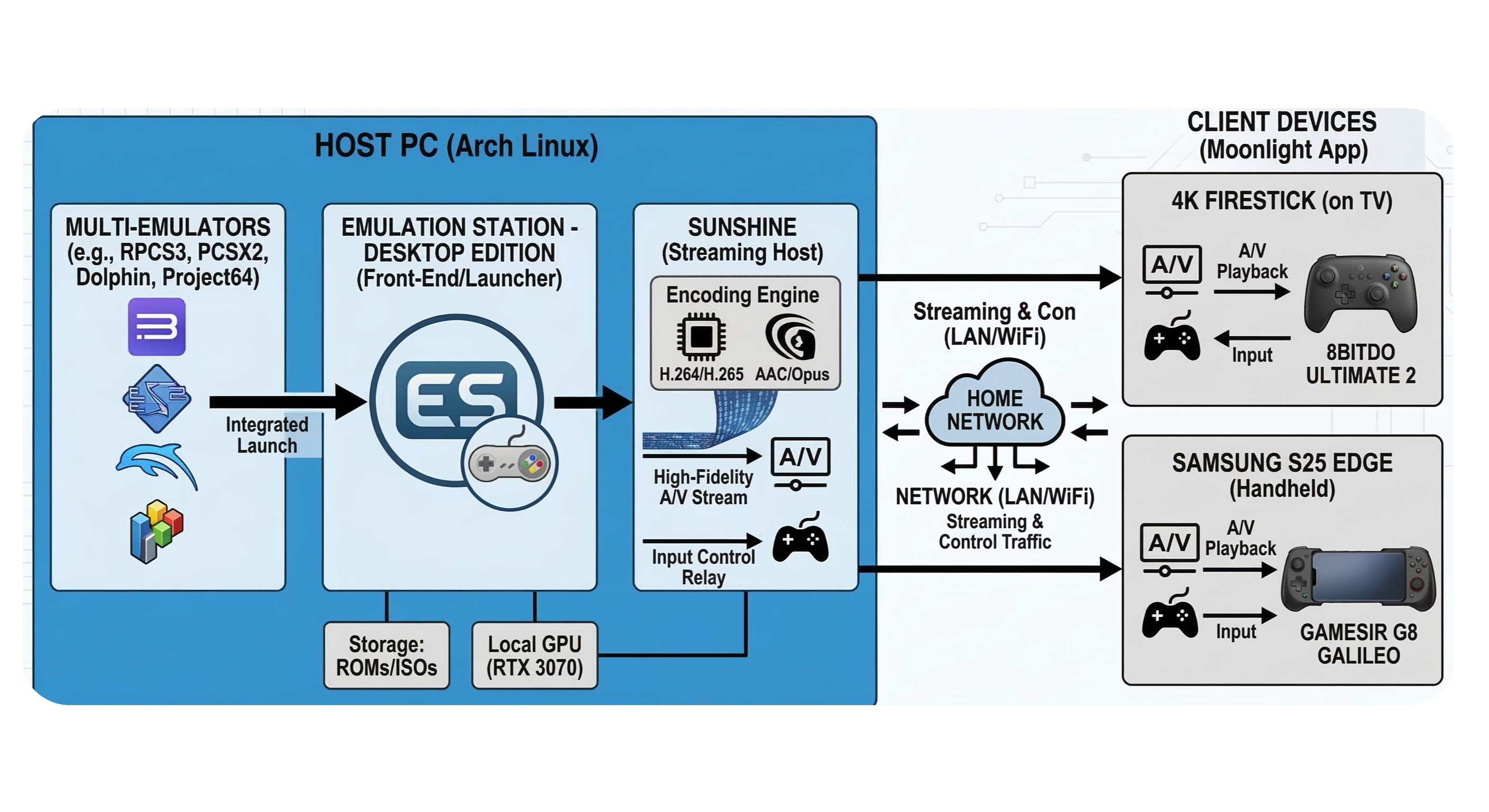
The foundations of this architecture is based foundationally on the hardware level. This consist of a custom build PC, a selection of compatible controllers, as well as compatible smart displays that I already owned.
- PC - i7-12700K | GIGABYTE NVIDIA RTX3070 Lite | 32 GB DDR5 | Arch Linux Distro
- Control Pads - 8BitDo Ultimate 2 | GameSir G8 Gallileo
- Smart Displays - Samsung Galexy S25 Edge | 4k Firestick.
In a sense I found myself working backwards because I was trying to find software solutions that would fit around hardware I already had on hand. My personal opinion is should find hardware that you works best with the software you want to use first, because as a consumer this is what will cost you fincially the most. A more reasonable entry point for hardware would look like this:
- Computer/Laptop - i3 intel or AMF Ryzen (2.0 GHzs+) | 8 GB of RAM | Any lightweight OS (FreeBSD or UNix/Linux are fine but even windows would work)
- Control Pad - Any control pad capable of SDL (StandardDirectMediaLayer) connection allowing for cross platform play.
- Smart Displays - Any Device that can run “Moonlight” the clientside app for the host-side stream server “Sunshine” (more on that later). I believe most SmartTVs (FireTv, Samsung, Sony) have Moonlight in their app stores the same can be said for the Google Play store and App Store for iPhone.
FOSS (Free Open-Source Software) for my use case was actually really easy to find as there is a wide veriety of console emulations avalible online for free. A sort list of some of the best emulators avaliable.
- Playstation - Duckstation
- Playstation2 - PCSX2
- Playstation3 - RPCS3
- Playstation4 - ShadPS4
- GameCube - Dolphin
- Nintendo64 - Project64
- Older - RetroArch
This is just a short list of the most popular emulators, there are hundreds more, but because I wanted software that I know will be well supported by a community and receive updates often I always opt to go with what is most used and well maintained.
System Architecture#
After installing these emulators, I organized the software into two file groups. The applications (launchers) themselves live on my home root(/) drive, while my the data including the roms and ISO files live on a seperate /mnt/Games/Emulation/ drive. I did this mainly because the storage drive has more space on it. The root drive is the fastest of the two which makes for better loadtimes and snappier UI. Each of the emulators once install require the specific BIOS firmware to be install in order for the system to actual play roms from your library. This firmware acts as a handskae between the software and the hardware and is crucial to the system functionality. PCSX2/RPCS3/Duckstation all retired that I go out and look for the Firmware, while RetroArch actually comes pre-installed with the BIOS file.
Finally, the piece de resistance was to install the Sunshine & Moonlight pair. Sunshine(the host) streams the audio/video by encoding it from my PC to client side devices which have Moonlight installed on them this allows me to bluetooth or direct connect my controller to those clients and send inputs over the controller. Thus far I’ve found that this is extrememly low lantency which makes play very enjoyable. I’ve found that my home is actually small enough that I can leave my 2.4GHz wireless dongle for my 8Bitdo controller plugged into my PC and it will take the inputs evn if I’m in my living room or bedroom playing. However, this also works if I plugged the dongle into my FireTV. For my phone I use the G8 controller and the emulators wil read the inputs through Sunshine perfectly as well, esccentially making my Samsung phone and Gamesir backbone into a SteamDeck that works well with games that were originally designed to be played on a handheld (Final Fantasy Tactics, Mega Man X, etc..)
Integration#
Once everything was in place I wanted to make sure I was create a “real deal console experience” not just launching games on my PC and then running to my TV to play them. This required that I configured Sunshin and Moonlight with a wake on LAN which feature which automated the launch of Sunshine from a Moonlight client. I also consolidated the many different emulators into a single Launcher “ES-DE” which comes stock with the original Playstation1/2(Duckstatiuon/PCSX2), GameCube(Dolphin), and GameboyAdvance(GBA) but could also be configured to launch a number of the other emulators as well.
This makes it so that anytime I want to play I simply turn on my TV or phone navigate to the Moonlight app, wait for a handshake between my PC and the device, and open ES-DE and scroll through whatever game I want to play.
Conclusion#
There are some tweak and constraints I’ve run into mainly that I have tried to make this system work remotely through Tailscale, but I often times run into shuttering due to bandwidth limitations. While on my homenetwork I’ve found that it works fine even while using other streaming services like Hulu or Netflix, because of course the connection is local.